Send feedback
Tell Songcode what works, what is broken and what is missing, from inside the app.
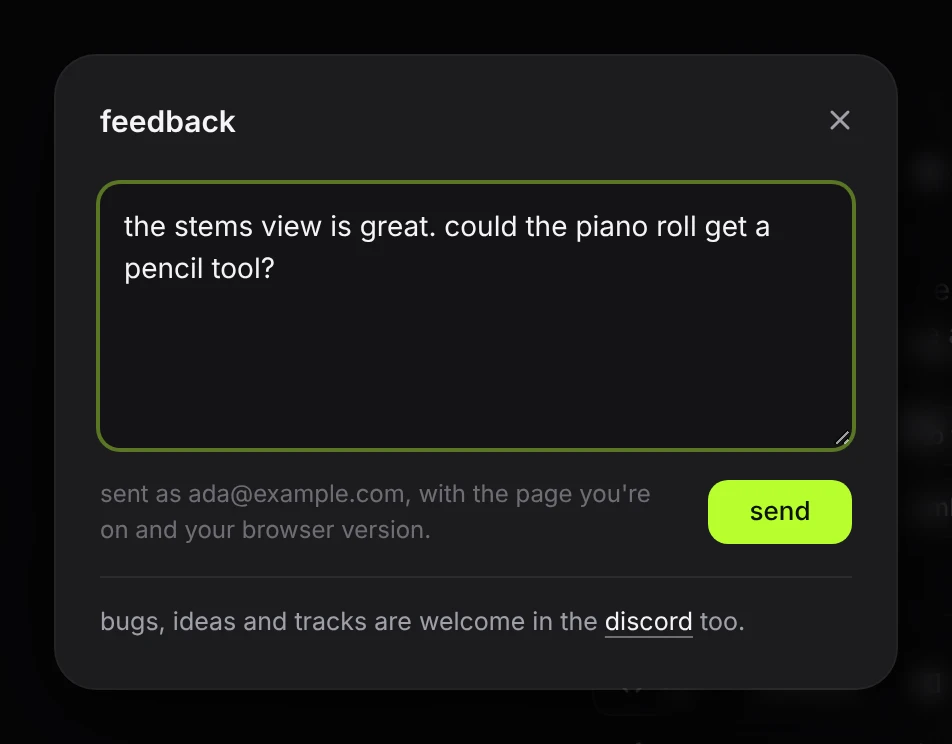
The speech bubble at the right end of the top bar opens the feedback sheet. It is the fastest way to report a bug or ask for something, and it works from any page of the app. For a conversation, use the Discord.
- Click the bubble icon.
- Write the message. It can be up to 4,000 characters.
- Press send, or ⌘↵ (ctrl+↵ on Windows and Linux).
The app confirms with feedback sent and the sheet closes. If sending fails, the sheet stays open with the reason and your text is kept.
#What is sent
- The message.
- The page you were on. On a published track that is the track’s address, so a report can be traced to it.
- A few words about what was on screen: which view was open (code or stems), which provider was selected, whether a track was playing, and the size of the window.
- Your browser’s version string, which is what tells a Safari bug from a Chrome bug.
- A reply address: your account’s email. The sheet says who the message is sent as.
Your network address is not stored with the message. Your API key, your prompt and the track’s code are not sent. If the problem is with a specific track, publish it and paste its link into the message.
Messages are limited per network: a few a minute, and a daily cap. Past either, the sheet says so and keeps your text.
#A useful bug report
Say what you did, what you expected and what happened. For a sound problem, name the stem. For a generation problem, include the prompt and the text of the status line. A link to the published track is worth more than a description of it.
#The Discord
The Songcode Discord is where people share tracks, report bugs, ask for features and talk about Songcode. Join it at discord.gg/kM69cqxhA2. Anyone can join, with or without an account or an invite.
The app links to it from the Discord icon in the top bar, the foot of the feedback sheet, the about card, the page a shared track opens on, and the early access page. Each link opens Discord in a new tab.
A bug report in the Discord helps most with the same things listed above, and a published link to the track turns a description into something others can play. The feedback sheet stays the private route: what you send there is read by Songcode only.